
Troubleshooting MySQL Full-Instance Backup Failures
Troubleshooting MySQL Full-Instance Backup Failures
MySQL Full Instance Backup Fails
Problem Description:
When initiating a backup using the MySQL full instance backup set, the operation fails. The UniSpace web interface displays an error message.

When checking the xtrabackup version from the OS layer on the MySQL client, the following error occurs:
[root@mysql01 bin]# ./xtrabackup8 --version
./xtrabackup8: error while loading shared libraries: libprotobuf-lite.so.3.19.4: cannot open shared object file: No such file or directory
Affected Scope:
UniSpace 2.0.x/2.1.x/2.2.x/2.3.x
MySQL 8.x.x
Xtrabackup 8.x.x
Solution:
1 Verify xtrabackup Configuration
Ensure the "xtrabackup" binary is properly configured and can output version information without error.
[root@mysql01 bin]# ./xtrabackup --version
2024-09-18T09:49:58.655464+08:00 0 [Note] [MY-011825] [Xtrabackup] recognized server arguments: --datadir=/usr/local/mysql-8.0.24/data --innodb_file_per_table=1 --innodb_buffer_pool_size=512M --innodb_flush_method=O_DIRECT --log_bin=mysql-bin --server-id=31
./xtrabackup version 8.0.30-23 based on MySQL server 8.0.30 Linux (x86_64) (revision id: 873b467185c)
2 Check Path Configuration in UniSpace Web UI
Confirm that the Xtrabackup binary path configured in the UniSpace backup job matches the actual path on the system and points to a valid "xtrabackup" executable.
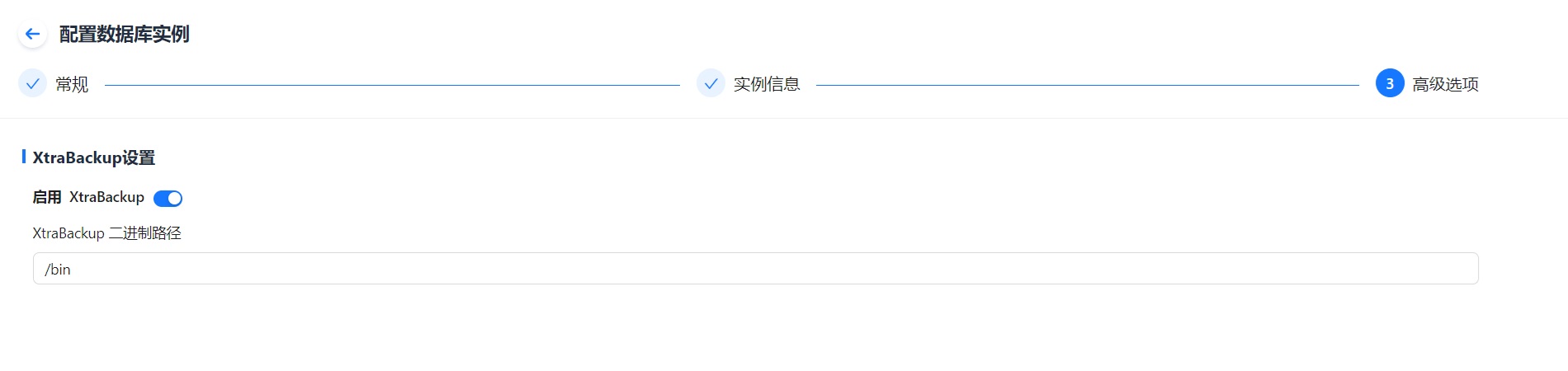
3 Optional Create Wrapper Scripts
As a workaround, you can create two shell scripts pointing to the correct xtrabackup binary path, grant them executable permissions, and use the script paths in the UniSpace configuration instead of the binary itself. Be sure to update paths inside the scripts according to your environment.
vim xtrabackup

#!/bin/bash

export LD_LIBRARY_PATH=$LD_LIBRARY_PATH:/datadmp/urman-agent/libs/xtrabackup_libs

XTRABACKUP="/datadmp/urman-agent/bin/xtrabackup8"

$XTRABACKUP "$@"vim xbstream
#!/bin/bash
export LD_LIBRARY_PATH=$LD_LIBRARY_PATH:/datadmp/urman-agent/libs/xtrabackup_libs
XTRABACKUP="/datadmp/urman-agent/bin/xbstream"
$XTRABACKUP "$@"[root@mysql01 bin]# chmod +x x*
[root@mysql01 bin]# ll
total 2
-rwxr-xr-x. 1 root root 162 Sep 18 10:55 xbstream
-rwxr-xr-x. 1 root root 165 Sep 18 10:55 xtrabackup