
Search...
Menu
Changing Node Port Numbers
Download
Changing Node Port Numbers
1. Change Port Before Installation
Step 1: On the management node, modify the install.conf file located in the us-server-xx installation package.
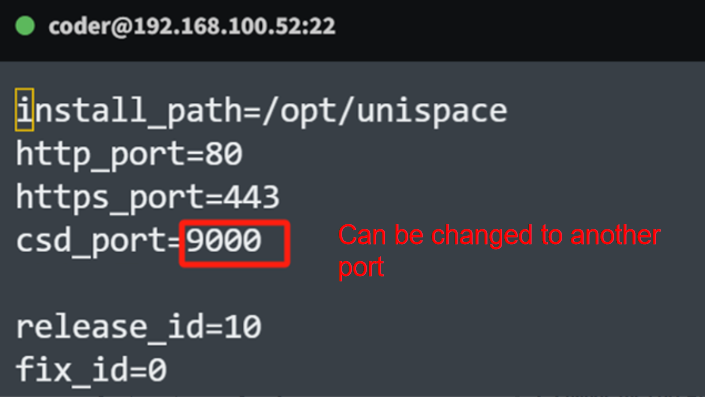
Step 2: Clients currently do not support changing the port before installation.
2. Change the Port After Installation
Modify the Client Startup Script: Add the launchd port parameter or directly edit the script unis_cn.sh to change port 9000 to an available port like 9001. You can use the following commands:
sed -i 's/9000/9001/g' /opt/unispace/unis_cn.sh
sed -i 's/launchd/launchd --csdport 9001 /g' /opt/unispace/unis_cn.sh
Modify the csd.json Configuration File: Change port 9000 to 9001 using:
sed -i 's/9000/9001/g' /opt/unispace/config/csd.json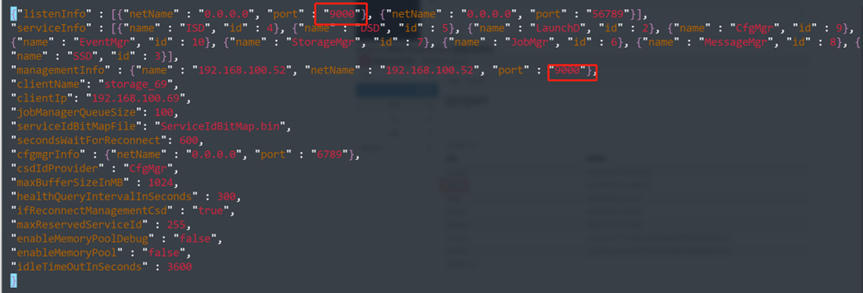
Modify the isd.json Configuration File: Also replace port 9000 with 9001 if applicable:
sed -i 's/9000/9001/g' /opt/unispace/config/isd.json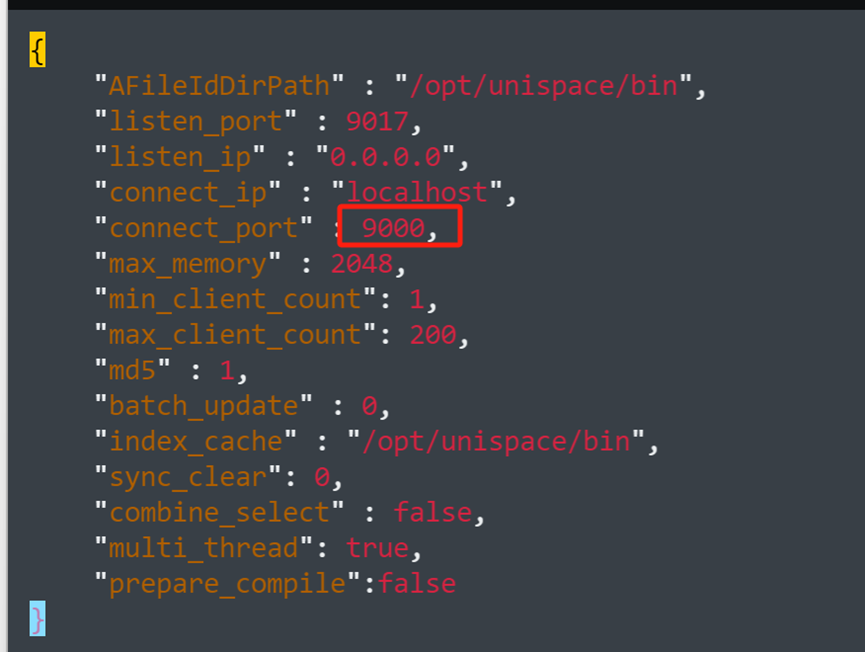
Update the Management Node Database: Use the client name (usually the IP or domain used during registration) and update the port to the new value (e.g., 9001):
UPDATE `node_client` SET `csdPort` = 9001 WHERE `hostName` = '192.168.100.180';Previous
Client Uninstallation
Next
Changing the Port Number for Meta Server or Client
Last modified: 2026-03-29